
Evidence and audit
The Audit Log
See who did what in your workspace, and when.
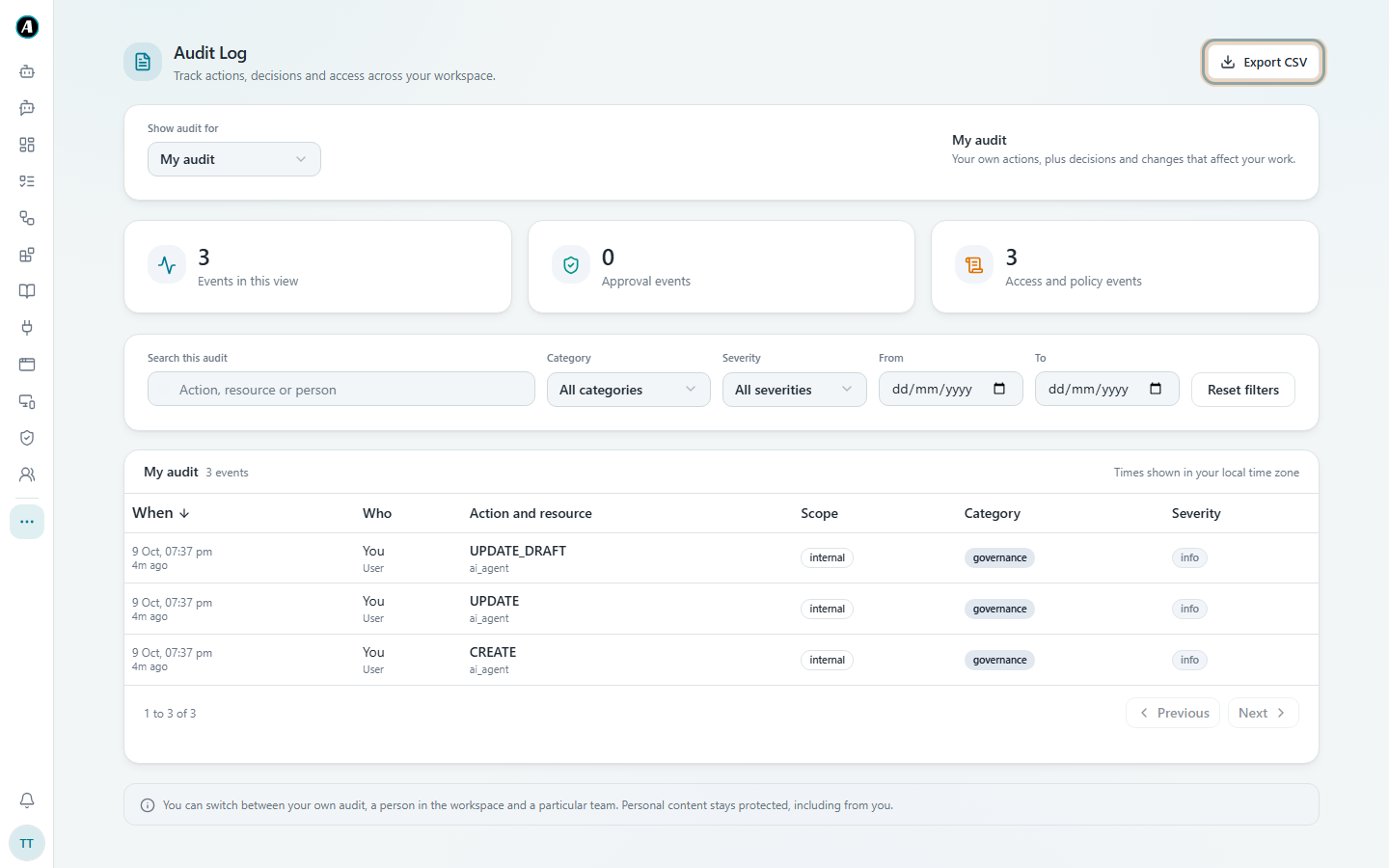
The Audit Log is a list of the important things people do in your workspace: who connected an app, who approved a step, who changed a setting. The Evidence Center covers what workflows did. The Audit Log covers what people did.
What's in it
- Apps: who connected or disconnected an app, and when.
- Approvals: who approved or rejected a step, linked to the exact run.
- Workflows: who started or stopped a run.
- Settings: an admin changing who may use which app, or other workspace settings.
Reading it
- Open Audit Log (under the three dots in the menu, or from Settings).
- Under Show audit for, choose My audit, a person, or a team.
- Use the search box, the Category and Severity filters, and the dates to find what you need.
- Click Export CSV to download the list, for example to send to an auditor.
Examples
- "Who connected the company Salesforce account?" Set Category to connectors and search "Salesforce". You see who did it and when.
- "Who changed the access rules for SharePoint last week?" Pick last week's dates and search "SharePoint".
- "Send me everything Alex did in March." Under Show audit for pick Alex, set the dates to March and click Export CSV.
Good to know
- Everyone can see their own activity. Admins and team leads can see more.
- Personal content stays private, even in the Audit Log.
- Nothing in the Audit Log can be edited or deleted from the app.